Why Does Fancy Text Show Up as Boxes (□)?
Those empty boxes are called "tofu". They appear when a device lacks a font for the Unicode characters behind fancy text — here is the full explanation, and how to avoid them.
On Discord, fancy text works in your display name, server nickname and messages, all of which accept Unicode. It does not work in your unique @username (the handle), which Discord now limits to lowercase letters, numbers, underscores and periods. Display names and nicknames are also capped at 32 characters, and some styled letters can eat into that faster than you expect.
Discord has three separate name slots, and only one of them rejects fancy text:
So the styled name people see in a server is your display name or nickname, never the @handle. Set the look with our Discord fonts generator and paste it into the display name or nickname field.
The handle is an identity primitive — it has to be unique, typeable and unambiguous so people can add and mention you. When Discord rolled the system out in its Evolving Usernames announcement, the stated goal was names that are "much easier to remember, verbalize and share with your friends" — which a string of styled symbols flatly is not. There is a security angle too: allowing look-alike Unicode would make impersonation trivial, since two handles can look identical while differing by code point. So Discord locks the username to a plain lowercase set and lets you decorate the display name instead, which sits right above the handle and carries all the visual style.
Discord caps display names and nicknames at 32 characters. The catch is that a fancy letter is not a plain character. Each one is a distinct symbol from Unicode's Mathematical Alphanumeric Symbols block, which sits high enough in Unicode that software stores it as a pair of code units — so length counters typically charge it as two toward the cap. A name that looks like about 16 fancy letters can already fill all 32, and combining-mark effects — the stacking accents behind cursed and zalgo looks — burn through even more. A name that looks short on screen can quietly blow past the limit and get cut off or refused at save.
This is why our Discord tool shows a live counter that already weights each fancy letter the way Discord will, so you see the real cost of a style before you commit rather than after it is rejected. If a name will not save, trimming two or three visible letters is usually enough.
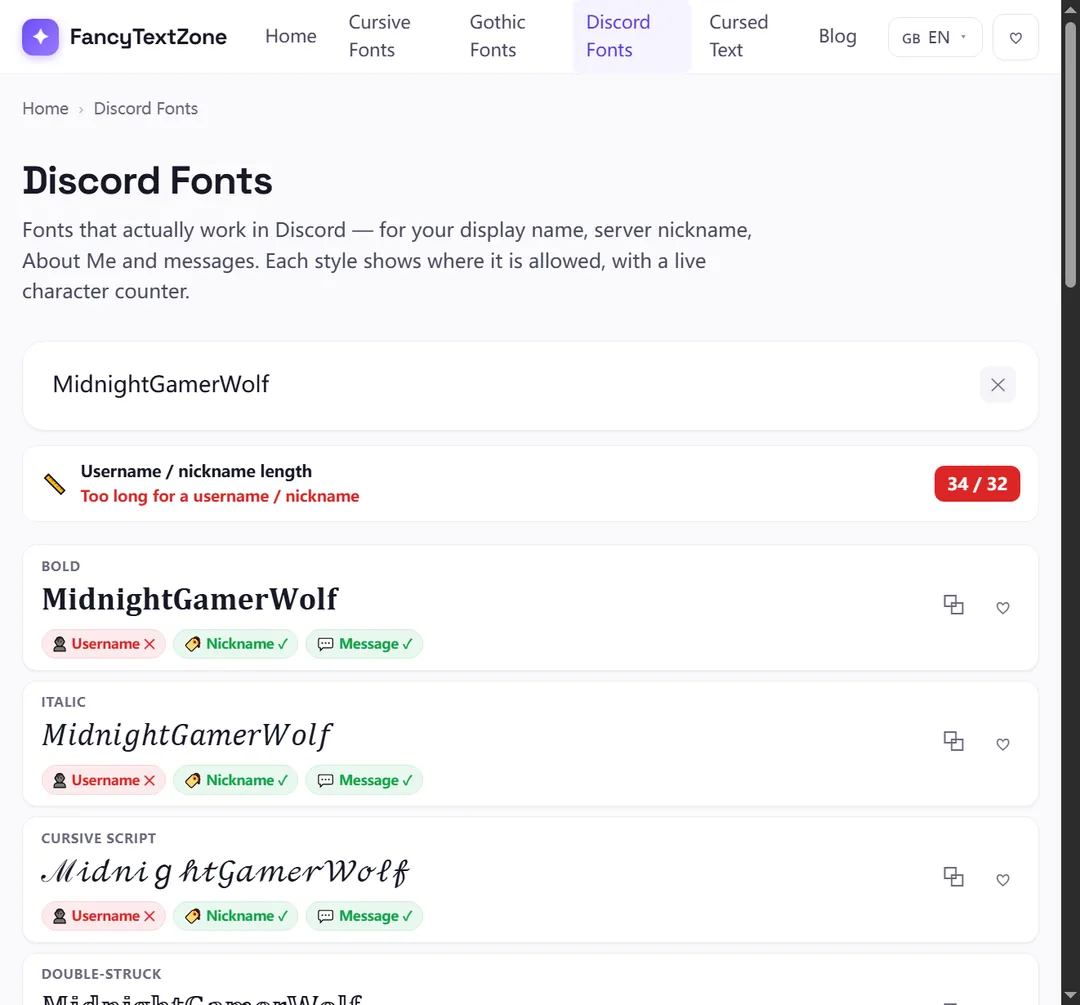
Yes. The message box accepts Unicode, so styled text posts fine. Two things to keep in mind. First, anything inside a code block (using backticks) is shown in a monospace font and will not display styled glyphs — that is by design. Second, your readers render the characters with their own device fonts, so a niche style may show boxes for some people on older systems.
| Slot | Fancy text? | Limit |
|---|---|---|
| Username (@handle) | No | a–z, 0–9, _ . — 2–32 chars |
| Display name | Yes | 32 characters |
| Server nickname | Yes | 32 characters |
| Messages | Yes | 2,000 characters (normal text) |
Discord splits this across two places. To set an account-wide styled name, open User Settings → Profile and edit your Display Name, then paste the styled text. To style your name in a single server only, open that server's member list (or right-click your name), choose Edit Server Profile, and set a Nickname.
Generate and count the name first in the Discord fonts tool so you can see it against the 32-character limit before you paste — combining-mark styles run out of room fast. Keep your @username plain; it is set separately under Account settings and rejects styled characters. If a glyph shows as a box in the preview, switch to a more widely supported style before saving.
A few things are worth knowing before you stylise a name. Mentions still work — typing @ and searching matches your underlying username and display name, so people can ping you normally. But a styled display name is harder for others to find by sight, and many servers run moderation bots that flag or block names with unusual characters, with zalgo and combining-mark stacks the most likely to trip them.
If you are in a community with rules, skim them first — plenty of servers require a readable, mentionable name. A light touch, like a script or bold display name, almost always passes. Aggressive cursed or zalgo names are the ones that get auto-removed or force a nickname reset.
For a clean Discord setup: keep the @username plain, style the display name or nickname, and watch the 32-character counter — especially with combining-heavy looks. Generate and count in one place with the Discord fonts tool. If you manage an Instagram presence too, the field rules are different there — see the Instagram bio, username and Story guide.
Those empty boxes are called "tofu". They appear when a device lacks a font for the Unicode characters behind fancy text — here is the full explanation, and how to avoid them.
Your Instagram bio and name field accept styled Unicode; your @username and Story text do not. Here is the rule for every field, and why.